Disclosure: some links on this page are affiliate links. If you sign up through them we may earn a commission, at no extra cost to you.
Short answer: In AWeber vs GetResponse, GetResponse is the better choice if you want advanced automation, sales funnels or webinars in one tool. AWeber is the better choice if you want a free plan, simple newsletters and 24/7 support with almost no learning curve.
Last updated: October 2026 · How we researched this: we checked the official AWeber and GetResponse pricing and features pages, read recent user reviews and third-party pricing trackers, and compared plan limits line by line.
Key takeaways
- Free option: AWeber has a free plan (up to 500 subscribers). GetResponse’s pricing page showed only paid plans with a free trial when we checked.
- Entry price: AWeber Lite is about $15/month for 500 subscribers. GetResponse Starter is $19/month for 1,000 contacts (billed monthly).
- Automation: GetResponse Marketer ($59/month) unlocks unlimited workflows, abandoned-cart emails and sales funnels. AWeber Plus gives unlimited, simpler automations.
- Extras: Only GetResponse has webinars, a course creator and a website builder (Creator plan).
- Send limits: GetResponse plans include unlimited monthly sends. AWeber caps sends at 10x or 12x your list.

AWeber vs GetResponse: quick comparison
| Feature | AWeber | GetResponse |
|---|---|---|
| Free plan | Yes, up to 500 subscribers | No free plan listed (free trial) |
| Entry plan | Lite, about $15/month (500 subscribers) | Starter, $19/month (1,000 contacts) |
| Full automation plan | Plus, about $30/month (500 subscribers) | Marketer, $59/month (1,000 contacts) |
| Monthly sends | 10x list (Lite), 12x (Plus) | Unlimited on paid plans |
| Automation builder | Simple visual automations | Advanced workflows with conditions and scoring |
| Webinars and courses | No | Yes, on Creator ($69/month) |
| Sales funnels | No | Yes, from Marketer |
| Support | 24/7, including phone | Live chat and email; priority support on Enterprise |
Prices are monthly-billing prices from the AWeber pricing page and the GetResponse pricing page, checked October 2026. Both are cheaper with yearly billing.
Pricing: what you really pay
The headline prices hide one big difference: what each entry plan can do.
GetResponse Starter includes a welcome series and only one custom automation workflow. AWeber Lite allows three automations but only one list. So for most businesses, the fair comparison is AWeber Plus against GetResponse Marketer.
| Plan level | AWeber | GetResponse |
|---|---|---|
| Free | $0 (500 subscribers) | Trial only |
| Entry | Lite ~$15 (500 subs) | Starter $19 (1,000 contacts) |
| Growth | Plus ~$30 (500 subs), ~$55 (2,500 subs) | Marketer $59 (1,000 contacts) |
| All-in-one | Done For You (setup service) | Creator $69 (1,000 contacts) |
| Large lists | Plus ~$135 at 10,000 subs | Custom Enterprise pricing at the top end |
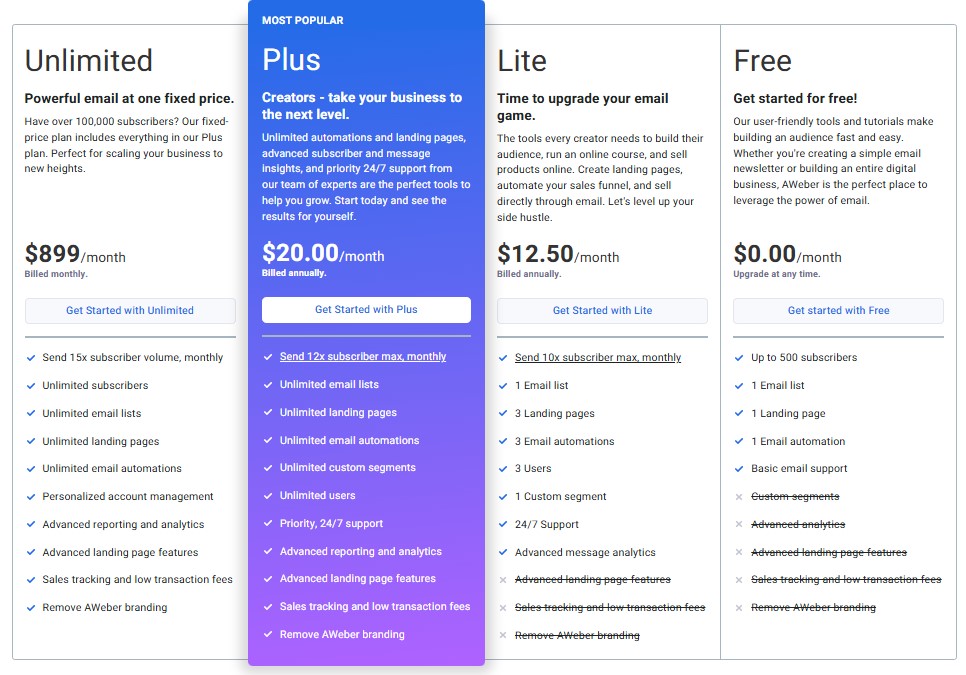
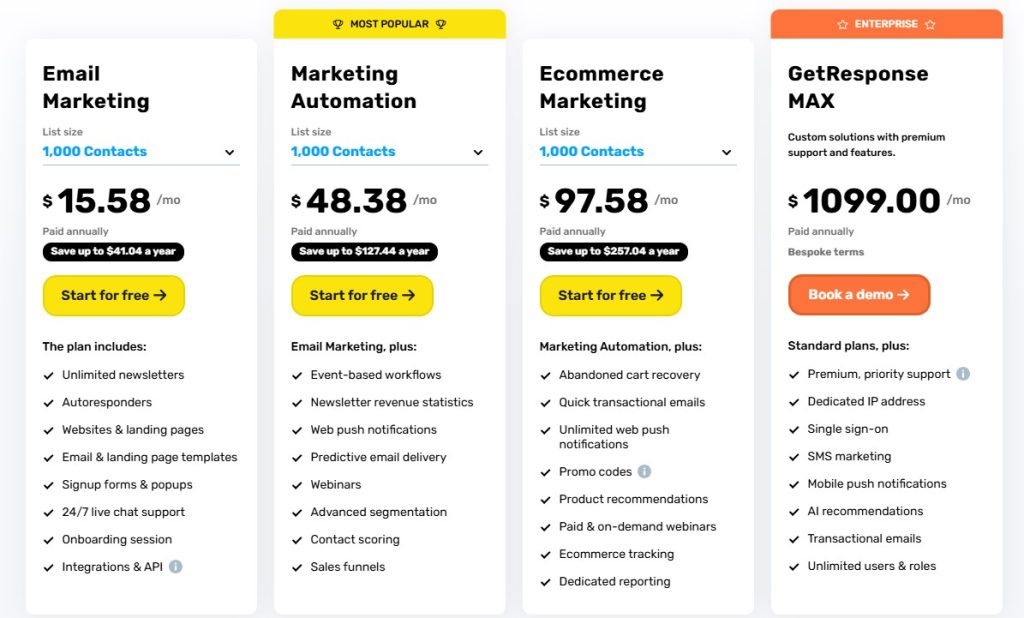
Note: the pricing screenshots above are older. Use the official pages for current numbers.
Automation and workflows
This is where GetResponse pulls ahead. Its workflow builder supports conditions, actions, filters and tags. On Marketer and above you get abandoned-cart recovery, promo codes with revenue reports and sales funnels.
AWeber’s automations are simpler. You can trigger emails when someone subscribes, gets a tag or clicks a link. That is enough for a welcome series and basic follow-ups, and it is much easier to set up.
Quick test: which automation level do you need?
- You only need a welcome series and a newsletter: AWeber is enough.
- You run an online store and want cart-recovery emails: GetResponse Marketer.
- You sell courses or host webinars: GetResponse Creator.
- You need lead scoring plus a sales CRM: consider ActiveCampaign (see our ActiveCampaign vs AWeber guide).
Email editor and templates
Both tools have drag-and-drop editors and mobile-friendly templates. GetResponse includes AI email and subject line generators on all paid plans, though Starter caps some AI uses.
AWeber has its own AI Writing Assistant, a subject line generator and Canva built into the editor. For a typical newsletter, both editors do the job well.
Landing pages, webinars and ecommerce
Both tools include a landing page builder and sign-up forms. AWeber also has an AI page builder and a link-in-bio page.
GetResponse goes much further. Its Creator plan adds webinars, a website builder, a course creator and paid newsletter subscriptions. If you would otherwise pay for a separate webinar tool, that can offset the higher price.

Integrations, support and deliverability
AWeber lists 750+ integrations, including Shopify, WordPress, WooCommerce, PayPal and Zapier. GetResponse also connects with major ecommerce platforms and Zapier.
AWeber’s 24/7 support includes a toll-free phone line. GetResponse offers live chat and email support, with priority support on Enterprise. Deliverability is good on both. Your own list hygiene and domain authentication matter more than the tool.

Who should NOT use each tool
- Skip AWeber if you need funnels, webinars or complex branching automations.
- Skip AWeber if you email your list every day and could hit the 10x or 12x monthly send cap.
- Skip GetResponse if you want to stay on a free plan while you grow.
- Skip GetResponse if you only send a monthly newsletter. You would pay for features you never use.
Pros and cons
| Pros | Cons | |
|---|---|---|
| AWeber | Free plan, very easy to learn, 24/7 phone support | Basic automation, send caps, Lite plan is limited |
| GetResponse | Advanced workflows, funnels, webinars, unlimited sends | No free plan listed, Starter allows only one custom workflow, steeper learning curve |
FAQ: AWeber vs GetResponse
Is GetResponse better than AWeber?
GetResponse is better for advanced automation, ecommerce and webinars. AWeber is better for beginners who want a free plan and simple newsletters with strong support.
Does GetResponse have a free plan?
When we checked in October 2026, GetResponse’s pricing page listed only paid plans (Starter, Marketer, Creator and Enterprise) with a free trial. Check the pricing page, as offers change.
Which is cheaper, AWeber or GetResponse?
AWeber is cheaper to start, thanks to its free plan and Lite plan at about $15/month. GetResponse Starter costs $19/month for 1,000 contacts, and full automation starts at $59/month on Marketer.
Can I use AWeber or GetResponse for webinars?
Only GetResponse has built-in webinars, on its Creator plan and above. With AWeber you would need a separate webinar tool connected through an integration.
Final verdict
Choose GetResponse if you want automation, funnels and webinars in one place and can use those features. Choose AWeber if you want simplicity, a free start and excellent support.
Still deciding? Read our full AWeber review or compare AWeber with Mailchimp in our AWeber vs Mailchimp guide. GetResponse also runs seasonal deals; you can check the current GetResponse offer or see GetResponse promotions.