Disclosure: some links on this page are affiliate links. If you sign up through them we may earn a commission, at no extra cost to you.
Short answer: To set up your Shopify store, start a free trial, choose a theme, add your products and collections, turn on payments, set shipping and taxes, write your store policies, connect a domain and remove the password page. Most beginners can do this in one or two days. This guide shows how to set up your Shopify store step by step, with the exact admin menus to use.
Last updated: October 2026 · How we researched this: we checked Shopify’s official pricing page and Help Center, compared current plan fees, and put the setup steps in the order that avoids rework.
Key takeaways
- Shopify’s trial was 3 days free, then $1/month for 3 months on most plans when we checked. No credit card is needed to start.
- Basic costs $39/month (or $29/month billed yearly) and is enough for most new stores.
- Use Shopify Payments if it is available in your country. Other payment providers add an extra fee of 2% on Basic.
- Set up shipping, taxes and policies before launch. These are the steps beginners skip most often.
- Keep apps to a minimum at first. Every app adds cost and can slow your store.

Step 1: Choose a Shopify plan and start your trial
You do not need to pick a plan on day one. Start the trial, build the store, and choose a plan before you launch. Here are the main plans from the official Shopify pricing page (US prices, checked October 2026).
| Plan | Monthly billing | Yearly billing | Online card rate | Fee if not using Shopify Payments |
|---|---|---|---|---|
| Basic | $39/month | $29/month | 2.9% + 30¢ | 2% |
| Grow | $105/month | $89/month | 2.7% + 30¢ | 1% |
| Advanced | $399/month | $359/month | 2.5% + 30¢ | 0.6% |
| Plus | from $2,300/month | — | 2.25% + 30¢ | 0.2% |
Which plan should you pick? Choose Basic if you are just starting. Move to Grow when you need staff accounts (Basic has none) or when your sales are high enough that the lower card rate saves more than the higher fee. For a deeper look, read our Shopify review.
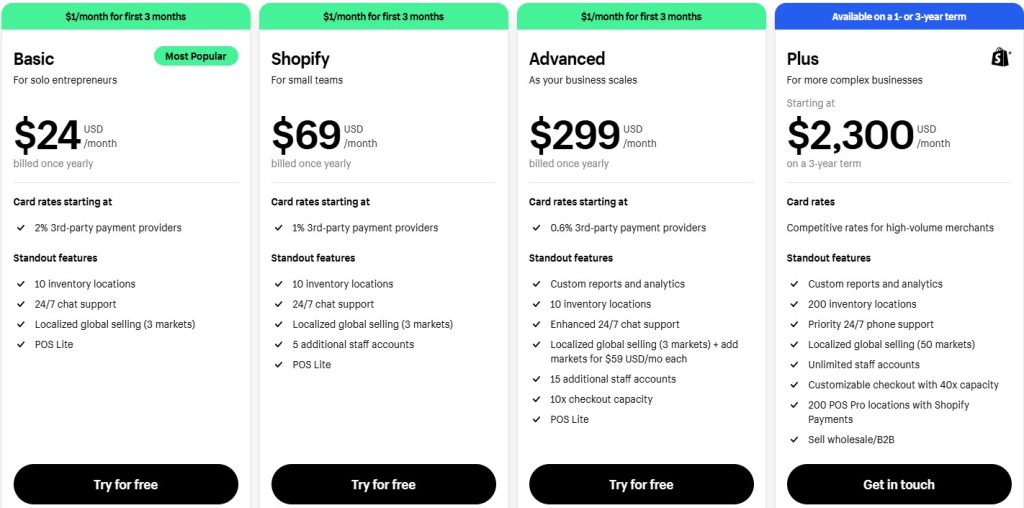
Note: the plan screenshot above is from an earlier year. Plan names and prices have changed since, so use the table.
Step 2: Fill in your store details
Go to Settings > Store details. Add your store name, contact email, business address and currency. Your currency is hard to change after your first sale, so set it now.
Next, open Settings > Users and turn on two-step authentication for your account. It protects your store and your payouts.
Step 3: Pick and customize a theme
Go to Online Store > Themes. Shopify gives you a free default theme, and the Theme Store has more free and paid options. A free theme is fine for most new stores.
- Upload your logo and pick two or three brand colors.
- Set up your main menu under Online Store > Navigation: Home, Shop, About, Contact.
- Check every page on your phone. Most shoppers will see your store on mobile.

Step 4: Add products and collections
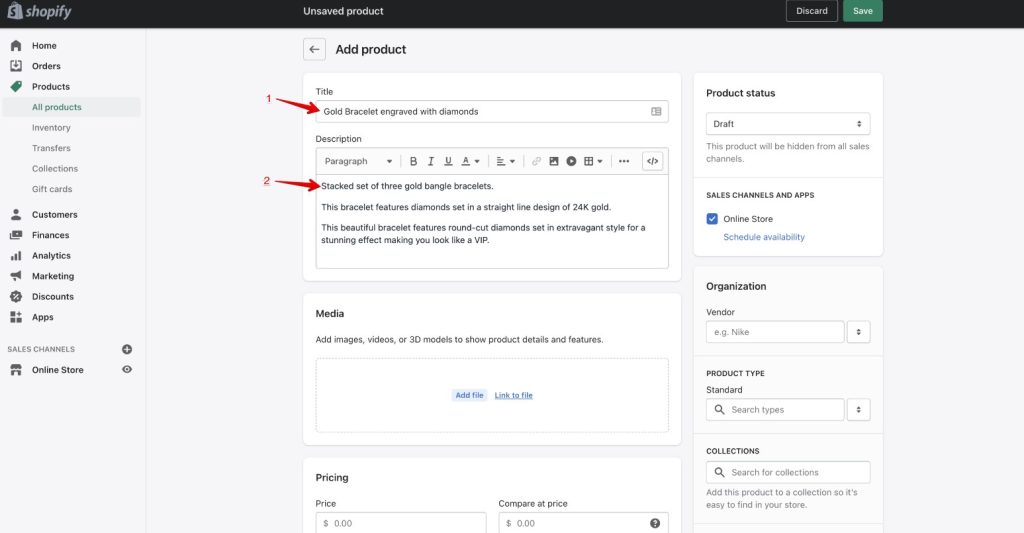
Go to Products > Add product. For each product, add a clear title, a description that answers buyer questions, good photos, price, SKU, weight and stock. Weight matters because Shopify uses it to calculate shipping rates.
Then group products under Products > Collections. Use a manual collection to pick products yourself, or an automated one that adds products by tag, type or price.
Tip: Shopify’s built-in AI tools can draft product descriptions. Always edit the draft so it sounds like you and is accurate.
Step 5: Set up payments
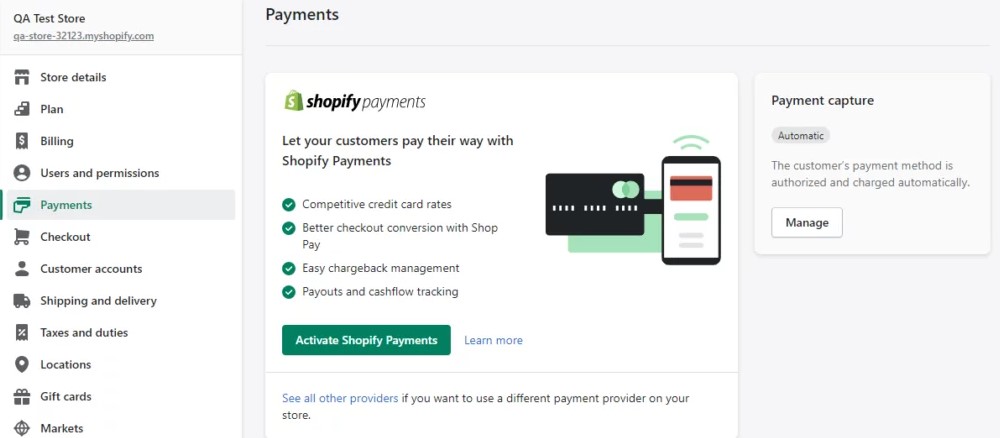
Go to Settings > Payments. If Shopify Payments is available where you live, activate it. You will need your business details and a bank account for payouts. It lets you accept cards, Shop Pay, Apple Pay and Google Pay without extra transaction fees.
You can also add PayPal. If you use a third-party card processor instead of Shopify Payments, Shopify adds its own fee on each order (2% on Basic). Shopify’s Help Center lists the countries where Shopify Payments works.
Step 6: Configure shipping, taxes and policies
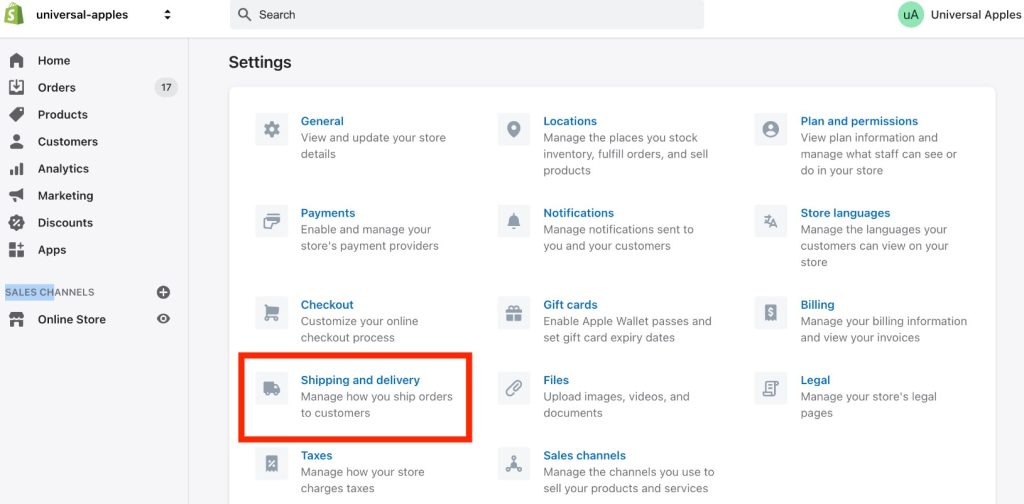
Go to Settings > Shipping and delivery. Create shipping zones (for example, domestic and international) and add rates. Start simple: one flat rate, plus free shipping above an order value that still protects your margin.
Then open Settings > Taxes and duties. Shopify can calculate sales tax automatically in many regions, but you are still responsible for registering and filing. Ask a local accountant if you are unsure.
Finally, go to Settings > Policies and add refund, privacy, shipping and terms of service pages. Shopify has templates, but edit them to match how you actually work.
Step 7: Connect a domain and set up basic SEO
Go to Settings > Domains. You can buy a domain through Shopify or connect one you already own. A custom domain looks more trustworthy than the free myshopify.com address.
For SEO, write a unique title and meta description for your homepage, collections and top products. Add alt text to product images and keep URLs short.
Step 8: Add only the apps you need
The Shopify App Store has thousands of apps. Start with three or four: reviews, email marketing, and maybe an upsell or shipping tool. See our list of the best free Shopify apps.
If you plan to dropship, note that Oberlo shut down in 2022. Current options include DSers, AutoDS and Shopify Collective. For email, tools such as Shopify Email or AWeber connect directly to your store; see our guide on how to use AWeber.
Related: Create Your Dream Store Today with Shopify
Shopify pre-launch checklist
Before you remove the password page under Online Store > Preferences, check every item.
- All products have photos, prices, weights and stock levels.
- Collections and menus link to the right pages.
- Shopify Payments (or another provider) is active and payouts are set up.
- Shipping zones and rates cover every country you sell to.
- Tax settings are reviewed.
- Refund, privacy, shipping and terms pages are published.
- Contact page and email work.
- Custom domain is connected and set as primary.
- A test order went through using test mode (then was refunded).
- The store looks right on a phone.
- Google Analytics or another analytics tool is connected.
- A plan is chosen, so the store does not pause when the trial ends.
Common mistakes when setting up a Shopify store
- Paying for many apps before the first sale.
- Skipping product weights, which breaks calculated shipping rates.
- Using a third-party payment provider and paying the extra Shopify fee without realizing it.
- Copying supplier product descriptions word for word. It hurts SEO and trust.
- Launching without a refund policy. Payment providers and customers both expect one.
FAQ: how to set up your Shopify store
How much does it cost to set up a Shopify store?
The Basic plan costs $39/month, or $29/month billed yearly, and new stores usually get a trial of 3 days free then $1/month for 3 months. Budget extra for a domain, any paid theme or apps, and payment processing fees.
How long does it take to set up a Shopify store?
A simple store with a few products can be ready in a day. A store with many products, custom design and full policies usually takes one to two weeks.
Can I set up a Shopify store for free?
You can build your store during the free trial without paying. To sell to customers after the trial, you need a paid plan.
Do I need a business license to start a Shopify store?
Shopify does not require one to sign up, but local laws may. Check your city, state or country rules for business registration and sales tax before you start selling.
Conclusion
Now you know how to set up your Shopify store: plan, details, theme, products, payments, shipping, taxes, policies, domain and a short list of apps. Work through the pre-launch checklist, place a test order, then open your store.
Want to compare platforms first? Read Shopify vs Wix vs WordPress.